AI-Assisted Development
Your AI coding tool can work directly against platformOS: validate Liquid, GraphQL and YAML before a file is written, deploy, read the instance error log, run GraphQL queries and Liquid snippets on a live instance, and run your tests.
All of it together is the platformOS Agent Kit: a setup command, four MCP servers, and a playbook of rules and knowledge that runs inside your editor. One command sets it up.
Note
This page assumes you have already installed pos-cli and authenticated an environment. Every tool that talks to an instance reads its credentials from the .pos file in your project, so set that up first.
What you get
pos-cli ai init sets up two kinds of thing: four MCP servers, and — for Claude Code — the Agent Playbook. MCP is the protocol AI tools use to call external tools; your tool starts the servers itself and you never run them by hand.
| Piece | Runs | What it gives the agent |
|---|---|---|
platformos-cli |
on your machine | Operations on your instance: deploy and preview a deploy, fetch the error log, run GraphQL and Liquid, fetch a page, run tests, lint the project |
platformos-supervisor |
on your machine | One tool, validate_code: checks Liquid, GraphQL and YAML before the agent writes a file |
platformos-liquid |
hosted by platformOS | The Liquid reference — every tag, filter and object, looked up by name |
platformos-graphql |
hosted by platformOS | The GraphQL reference — operations, types, arguments and nullability |
| platformOS Agent Playbook | in your project | Rules, topic files and a platformOS coding agent. Not a server — files your editor reads |
Only platformos-cli uses your credentials and acts on your instance. platformos-supervisor runs locally and reads only the project directory it was started in — it checks code and never contacts an instance. The two hosted servers take no credentials and run no code either; they only answer questions about the published Liquid and GraphQL reference, which is why registering them for all your projects is a reasonable thing to do.
The difference this makes in practice: platformOS Liquid is its own dialect — it has tags and filters other Liquid implementations do not, and lacks some they do — and platformOS has GraphQL shapes of its own. The usual failure is not an error message — it is a page that deploys, returns 200, and does the wrong thing. An agent that can look a symbol up and validate a buffer before writing it does not have to guess.
Set up your AI tool
Run this in your project root:
pos-cli ai init
It asks up to three questions:
- Which AI tool do you use? — Claude Code, Cursor, VS Code, opencode, or Other. "Other" prints a JSON snippet to paste into any MCP-capable tool yourself.
- Also register the documentation servers? — the hosted Liquid and GraphQL reference, for this project or for all your projects.
- Also install the platformOS Agent Playbook? — Claude Code only; see the next section.
Each tool keeps its MCP configuration in its own file, and pos-cli ai init writes the right one:
| Tool | This project | All your projects |
|---|---|---|
| Claude Code | .mcp.json |
~/.claude.json |
| Cursor | .cursor/mcp.json |
~/.cursor/mcp.json |
| VS Code | .vscode/mcp.json |
printed for you to paste — its path depends on your platform and build |
| opencode | opencode.json |
~/.config/opencode/opencode.json |
Entries you have edited yourself are never overwritten: pos-cli ai init tells you what it would have written and leaves your version alone.
To skip the questions — in a setup script, for instance:
pos-cli ai init --tool claude                  # local + documentation servers
pos-cli ai init --tool cursor --docs global    # documentation servers for all projects
pos-cli ai init --tool claude --no-docs        # local servers only
pos-cli ai init --tool claude --agent-playbook # also install the Agent Playbook
Install the platformOS Agent Playbook
The servers above let an agent look platformOS up, check code before it is written, and act on your instance. The platformOS Agent Playbook is the part of the Agent Kit that tells it which facts matter and in what order to work. It unpacks to a .claude/ directory in your project and contains:
- The order of work and the prohibitions, loaded on every request — look the symbol up, validate the buffer, write, preview, deploy, fetch the page, read the data back. Writing a file and deploying it to find out whether it works is prohibited.
- Per-directory rules, loaded when the agent opens a file in that directory — pages, partials, layouts, commands, queries, GraphQL, schema and translations.
- Topic files it can consult on demand, covering the platformOS behaviour that fails silently and that no linter reports.
- The platformOS coding agent, a named agent for writing and changing platformOS code. The Playbook makes it the default agent for the project, so it handles platformOS work without you selecting it.
- A diagnostics hook that attaches the documented platformOS rule, and its fix, to a validation finding — so a terse error message arrives with the explanation beside it.
With the Playbook installed, Claude Code starts with that agent already selected:
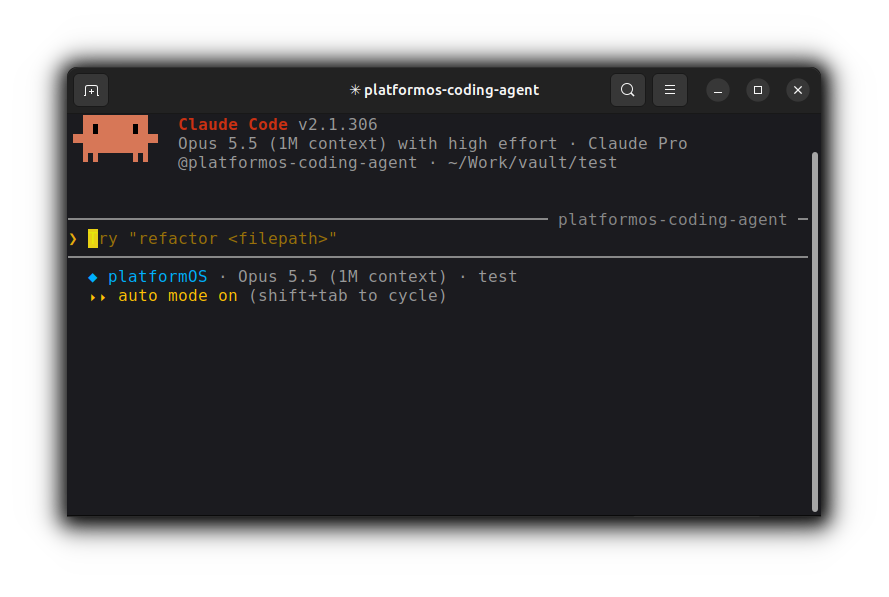
It is offered for Claude Code and no other tool, because that .claude/ layout is Claude Code's own. The four MCP servers are not Claude-specific — Cursor, VS Code and opencode get all of them. Answer yes to the third question, or pass --agent-playbook; --no-agent-playbook declines without asking.
If you already have a .claude/ directory it is never overwritten — it holds your own rules and settings. pos-cli says so and prints the download link instead, so you can unpack it somewhere harmless and merge in the parts you want:
curl -fsSL https://documentation.platformos.com/assets/platformos-agent-playbook.zip -o playbook.zip
unzip -q playbook.zip -d playbook-tmp && rm playbook.zip
That leaves the Playbook at playbook-tmp/.claude/, next to your own .claude/ rather than on top of it.
Check that it works
Restart your AI tool so it picks up the new configuration, then ask it something only these servers can answer — "which platformOS environments are configured?" or "validate this Liquid snippet for me".
To see exactly what your tool was given, without starting it:
pos-cli mcp-config
That prints every tool the server exposes, every tool it is hiding and why, and the instructions sent to the client.
What to expect
These tools act on a real instance. Three things are worth knowing before you hand an agent the keys:
- A deploy is not a test.
pos-cli ai initregisters a server whose default selection can deploy. Ask for a preview first — the agent has a dry-run tool that reports what a deploy would add, change and delete. - Validate before writing, not after.
validate_codechecks a buffer. It only helps if the agent calls it with the content it is about to write. - Always name the environment. With more than one environment in
.pos, a call that could change an instance is refused until you say which — but with exactly one, it lands there with nothing asked.
For the full reference — every server, its tool profiles, and what the Playbook asserts — see AI - Agent Kit in the Developer Guide.